Top 20 Features All Features Screens How It Works Mobile Contact
Free Trial Log In
Back to the top 20
Feature guide

Every BookinPro feature, explained.

A closer look at the 20 features shops use most, how each one works, and why it matters. Further down are 40 more tools that come with every plan.

01 · Scheduling

Live multi-staff calendar

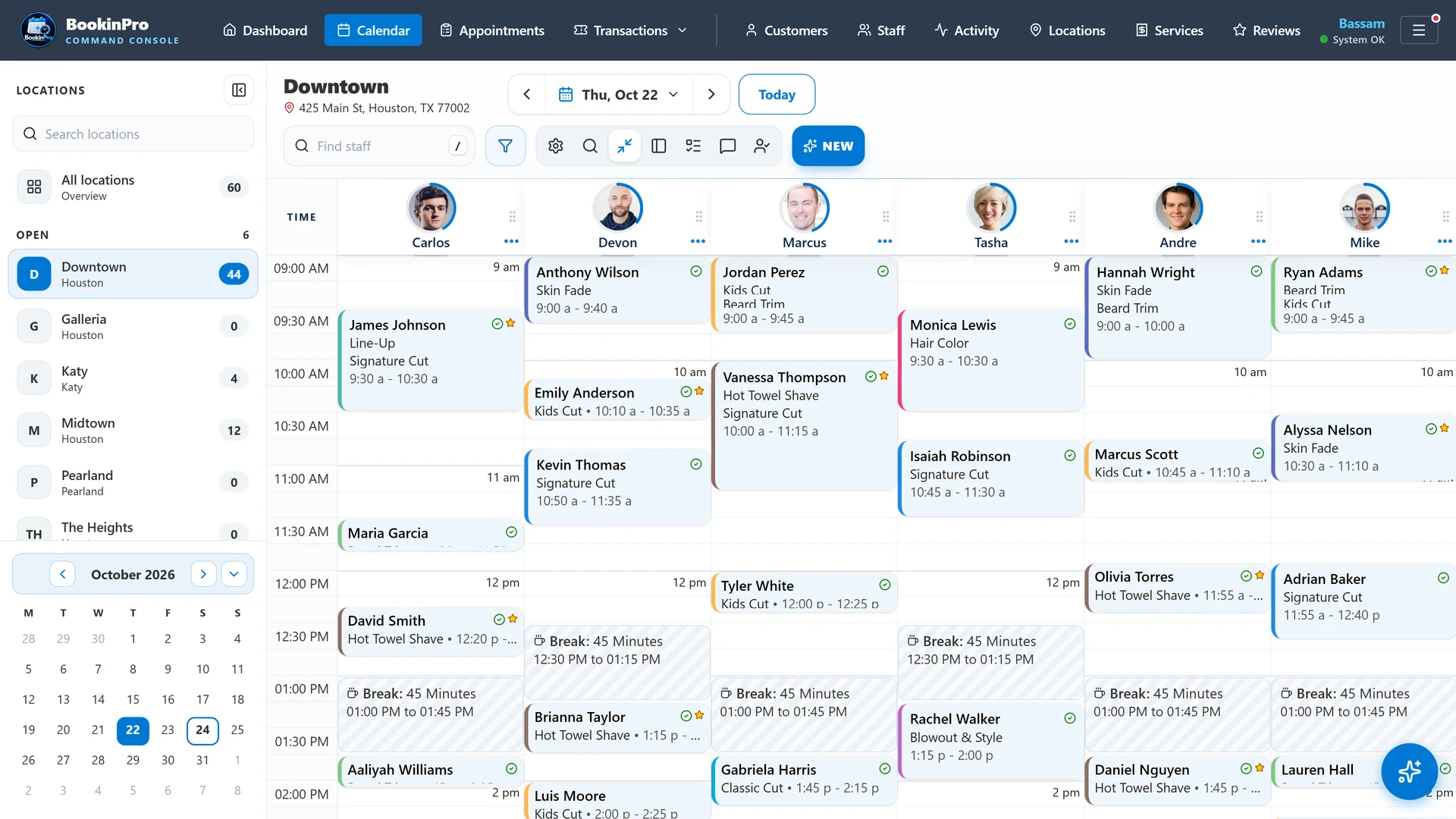
The calendar is the heart of BookinPro. Every staff member gets a column, every appointment is a colored card, and every change appears on every screen in the shop the moment it's saved. Nobody needs to press refresh.

admin.bookinpro.app/your-shop · Calendar
Live multi-staff calendar

What you get

  • Side-by-side columns for every staff member, with first names and photos
  • Drag an appointment to a new time or to another staff member
  • Stretch a card to change its length, snapping to 5-minute steps
  • A green now-line that moves with the clock
  • Real-time sync across the front desk, back office and phones
  • Month calendar in the side panel; click the month name to jump back to today
  • Fit-to-screen and working-staff-only views
  • One-day schedule changes for sick days and covered shifts

Why it matters

When three people book at once, the calendar has to be the single source of truth. Live sync means nobody books a chair that was taken ten seconds earlier on another screen.

Best for

Busy shops with several chairs and more than one person taking bookings.

Back to top
02 · Scheduling

Smart & recurring breaks

Breaks are part of the schedule, not an afterthought. Set them once, repeat them on any pattern, and move them with a drag when the day changes.

What you get

  • One-off or repeating breaks: daily, weekly, monthly or yearly
  • Edit just one day, or every day from that one forward
  • Skip a single day without breaking the pattern
  • Drag a break to a new time on desktop or phone; a repeating break moves for that day only
  • A break can never be dropped on top of a booked customer
  • Breaks block online booking automatically
  • Phone break sheet with one-tap lengths: 15, 30, 45 minutes or 1 hour

Why it matters

Online booking only works when the system knows when people are actually free. Repeating breaks keep lunch protected without anyone re-entering it every week.

Best for

Teams with set lunch hours, school runs or regular meetings.

Back to top
03 · Scheduling

Next Barber Up rotation

Walk-ins are fair when the line is clear. Next Barber Up orders your team by who served a customer least recently, using the shop's sales tickets, so the next walk-in goes to the right chair.

What you get

  • The rotation updates itself from real sales tickets
  • Separate lines for barbers and stylists, grouped by staff title
  • Show both lines or just one with a single tap
  • Drag to reorder when the shop needs to
  • Color badges show who's available and who's with a client
  • A red marker for staff whose shift is ending soon
  • Back-dated or voided tickets never scramble the line

Why it matters

No more arguments over whose turn it is. The rotation is transparent, automatic and the same on every screen in the shop.

Best for

Barbershops and salons that take walk-ins.

Back to top
04 · Scheduling

Double-booking protection

Two customers can't take the same chair at the same time. BookinPro checks the schedule again at the last second before saving, and holds an online time slot while the customer finishes booking.

What you get

  • A last-second conflict check before every save from the calendar
  • A clear warning instead of a silent overlap
  • Online time slots held while the customer enters their details
  • Abandoned holds released automatically
  • Server-side slot check for every booking from the website
  • Buffer time per staff member between appointments

Why it matters

A double-booked customer is a lost customer. Protection happens automatically, even when the front desk and the website book the same minute.

Best for

Any shop that takes online bookings alongside phone and walk-in traffic.

Back to top
05 · Online booking

24/7 branded booking site

Every shop gets its own booking page at bookinpro.app/your-shop. Customers choose a location, services, a professional and a time, from availability that is always live.

Booking site location picker
Booking site team with photos

What you get

  • Five-step guided booking: location, service, professional, time, details
  • Live availability from staff schedules, breaks and shop hours
  • "Any available professional" option
  • Several services in one visit, with running price and time totals
  • Seven-day date strip and a step progress bar
  • You set the booking window and minimum notice; past times never show
  • "Fully booked" shows when a professional has no openings left today
  • Your Google star rating shown on the site, refreshed daily
  • Your logo, colors and text-message opt-in wording

Why it matters

Customers book at 11 PM. Your phone doesn't have to ring, and the chair still fills.

Best for

Every shop that wants fewer phone calls and more bookings.

Back to top
06 · Online booking

Password-free customer portal

Customers don't need to remember another password. They sign in with a one-time code sent to their email or phone and see all their visits in one place.

What you get

  • One-time sign-in codes by email or text message
  • Codes expire quickly and allow only a few tries
  • Upcoming and past visits in one list
  • Reschedule or cancel within the rules you set
  • Visit history linked automatically by verified email or phone
  • Built-in protection against someone registering a customer's email

Why it matters

Self-service rescheduling cuts phone calls, and safe sign-in keeps every customer's history private.

Best for

Shops with regulars who book again and again.

Back to top
07 · Online booking

Text check-in links

Before the appointment the customer gets a text with a check-in link. One tap tells the shop they've arrived: no clipboard and no line at the front desk.

What you get

  • A check-in link sent automatically before the visit
  • One tap checks the customer in, and the calendar updates live
  • Families booked back-to-back on one phone get a single text that checks in everyone
  • No check-in text for visits booked in the last 2 hours; they just got a confirmation
  • Both rules can be switched off in settings

Why it matters

Fewer texts, less noise, and staff know exactly who's waiting.

Best for

Shops with a waiting area and back-to-back appointments.

Back to top
08 · Messaging

Reminders with SMS failover

Confirmations and reminders go out on schedule, by text and email. If the main text provider has a problem, the backup provider sends the message instead.

What you get

  • An instant confirmation when an appointment is booked
  • Reminders at the lead times you choose
  • Cancellation and reschedule messages
  • Automatic failover to a backup text provider, with retries first
  • A delivery log for every message: sent or failed, to whom, by whom and when
  • STOP and opt-out replies handled automatically
  • Email templates that display correctly in Outlook and Gmail

Why it matters

A reminder that never arrives becomes a no-show. Failover means one provider's bad day doesn't become yours.

Best for

Every appointment-based business.

Back to top
09 · Messaging

Two-way text inbox

Customers would rather text than call. The inbox keeps every conversation in the business, not on someone's personal phone.

What you get

  • Threaded conversations with every customer
  • Customers can text first; their messages land in the inbox
  • Saved templates that fill in the customer and appointment details
  • Quick templates as one-tap links in the appointment window
  • Voice dictation for replies
  • Jump from a conversation to the customer's next appointment
  • Unread badge and search
  • Long chats open on the newest 50 messages, with older ones on demand

Why it matters

A quick text answer books the appointment that a missed call would lose.

Best for

Shops with a front desk or a manager who handles customer questions.

Back to top
10 · Messaging

Instant push alerts

Staff hear about new bookings in their chair the moment they happen, right on their phone's lock screen.

What you get

  • A push notification for every new booking
  • Tap the alert to open the app
  • A reminder, with set-up steps, for staff whose alerts are off
  • "Remind me later" hides it for 2 hours
  • A one-tap test alert to confirm the phone is ready
  • Works on iPhone (installed app) and Android

Why it matters

Staff can plan their day without watching a screen, and no booking surprises them at the chair.

Best for

Barbers and stylists who live on their phones between clients.

Back to top
11 · Growth

Review growth engine

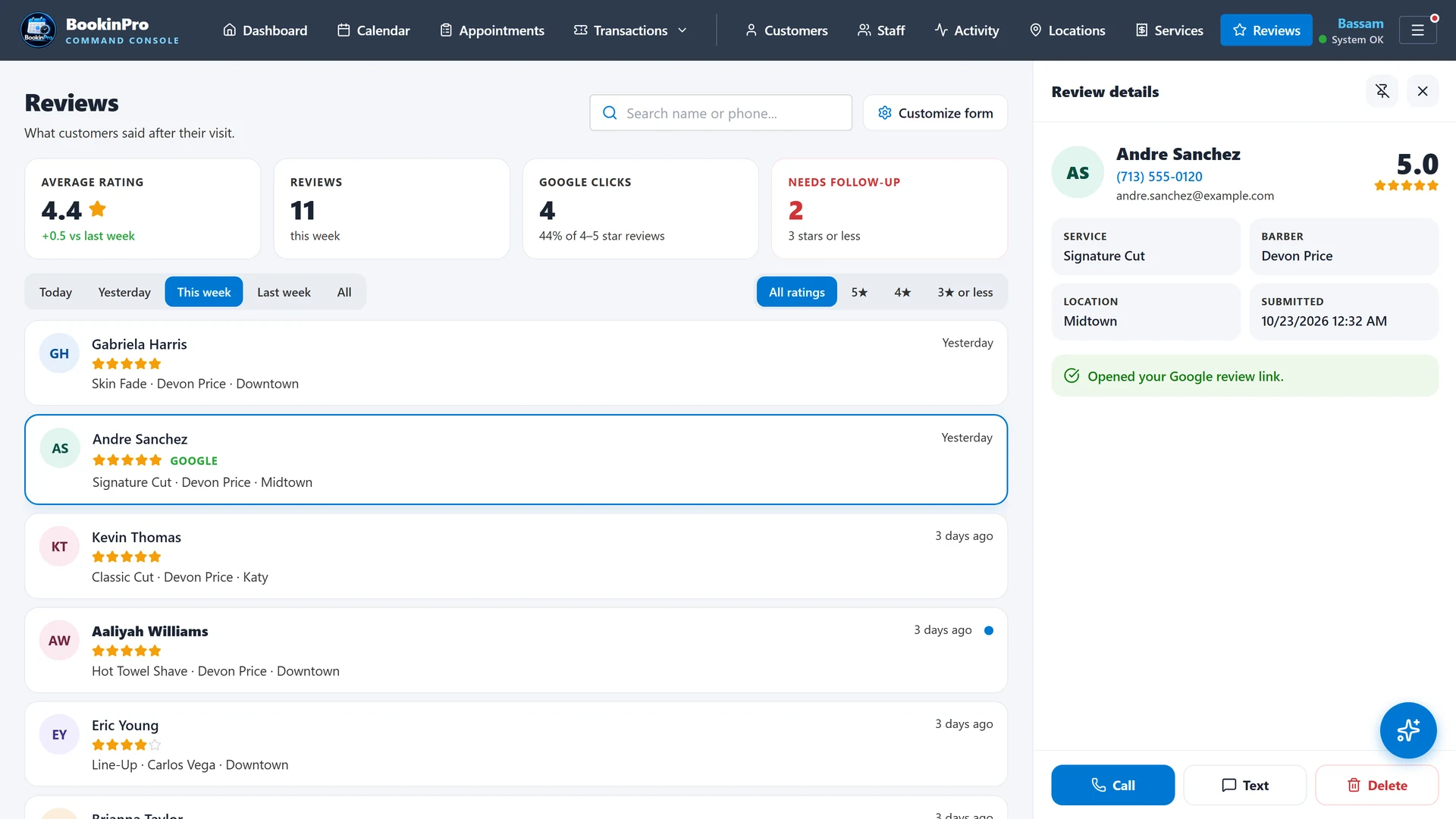
After the visit, customers are asked how it went. Happy customers are guided to your Google review page; unhappy feedback comes to you privately, so you can make it right first.

admin.bookinpro.app/your-shop · Reviews
Reviews dashboard

What you get

  • A feedback request sent automatically after completed visits
  • Happy customers guided to your Google review page
  • Unhappy feedback delivered privately to you
  • Reviews dashboard with summary tiles, filters and a detail panel
  • Call, text or delete straight from a review
  • The menu star flashes only when new reviews arrive
  • Google rating and review count refreshed daily on your booking site

Why it matters

Most new customers check your stars before they book. More five-star reviews, fewer public surprises.

Best for

Any shop that wants to rank higher on Google Maps.
Back to top
12 · Growth

Targeted campaigns

Your best marketing list is the customers who already came in once. Campaigns reach exactly the right group with the right message.

What you get

  • Ready-made groups: regulars, lapsed customers, birthdays and never-booked
  • Text and email campaigns
  • Schedule a campaign for a future date and time
  • Promotion templates, with AI help writing the message
  • Campaign performance tracking
  • Opt-outs respected automatically

Why it matters

Bringing back a lapsed customer costs far less than finding a new one.

Best for

Slow weekdays, holidays and new-service launches.

Back to top
13 · Growth

Customer CRM

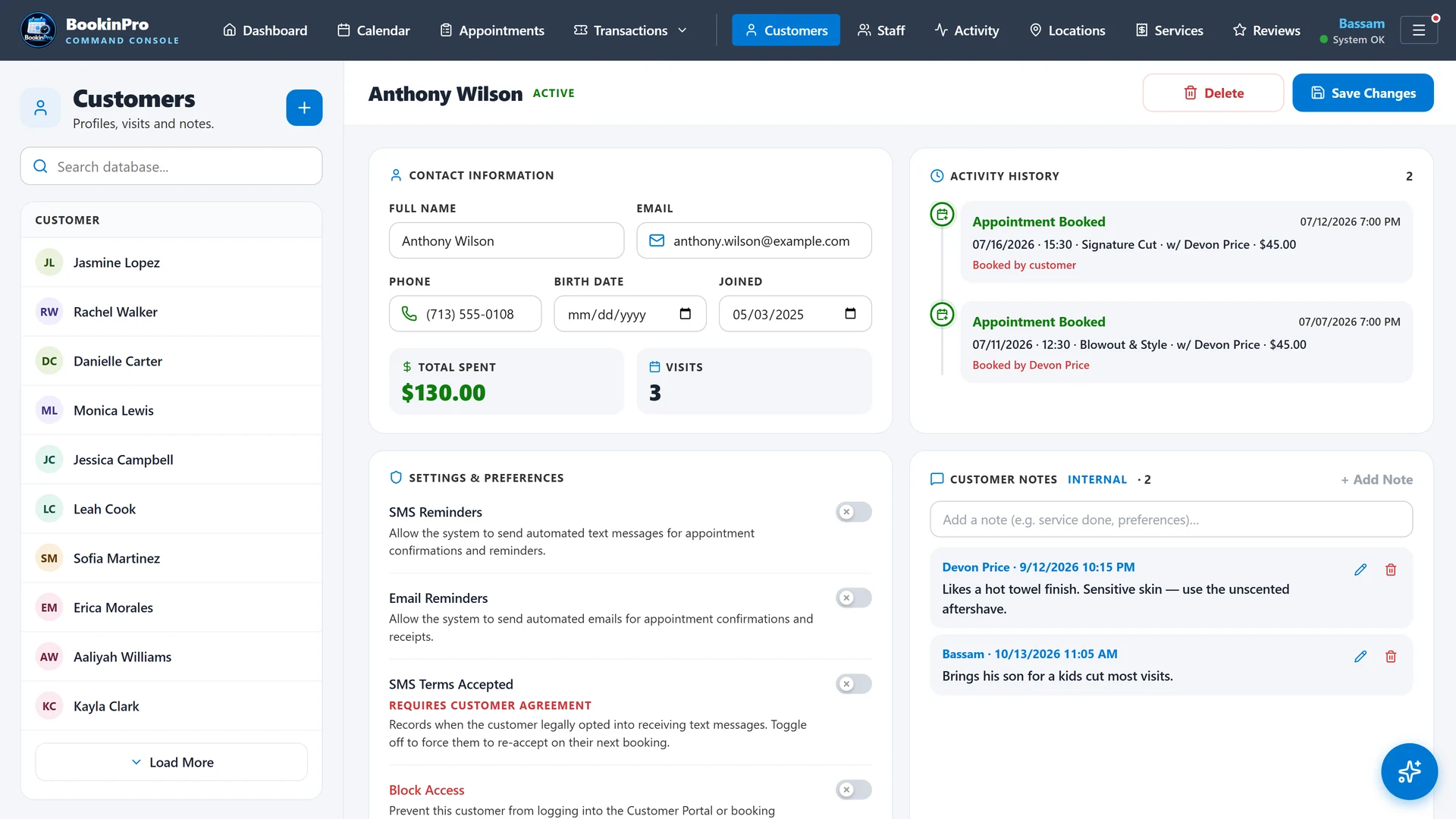
Every customer has one complete record: who they are, every visit, what they spent and what your team knows about them.

admin.bookinpro.app/your-shop · Customers
Customer profile

What you get

  • Phone, email, birthday, join date and photo
  • Phone-first search from the calendar, inbox and appointment window
  • Full visit history, total spent and visit count
  • Staff notes with author, time and edit history
  • Activity timeline of every appointment change
  • Duplicate finder and spreadsheet import
  • Phone and email hidden from roles that shouldn't see them
  • Tap to call, text or email

Why it matters

Remembering a customer's usual cut, or that they were unhappy last time, is what turns a visit into a regular.

Best for

Shops that want every staff member to know the customer.

Back to top
14 · Team & mobile

Staff app on every phone

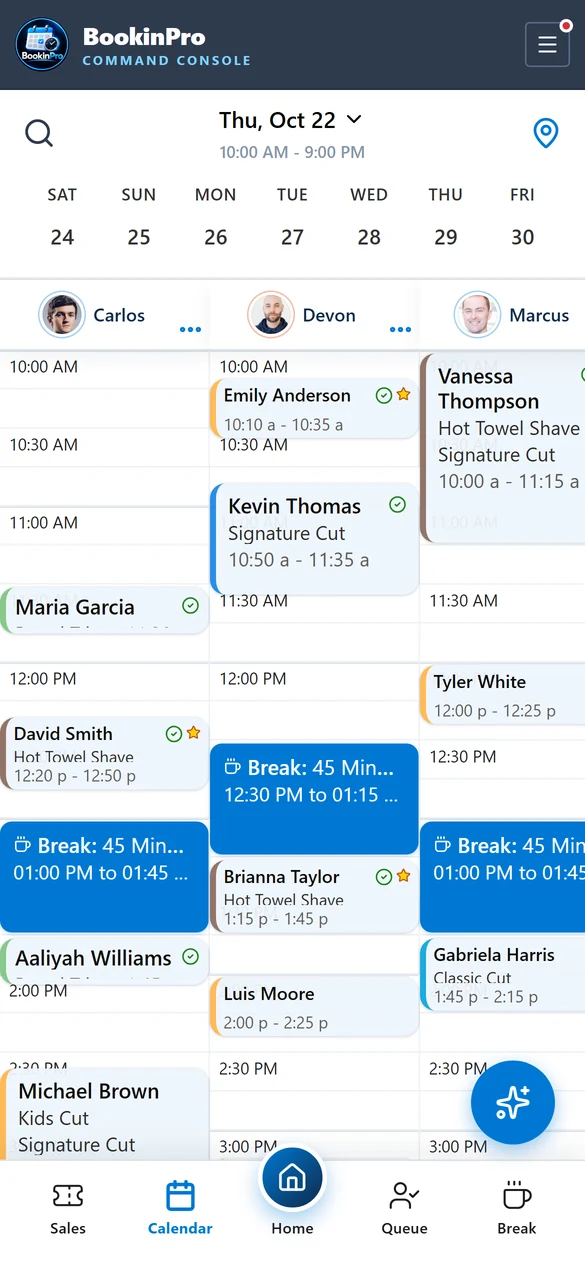
BookinPro installs to the home screen like a native app, with no app store and no download size. It opens straight into your shop.

Staff app calendar on a phone
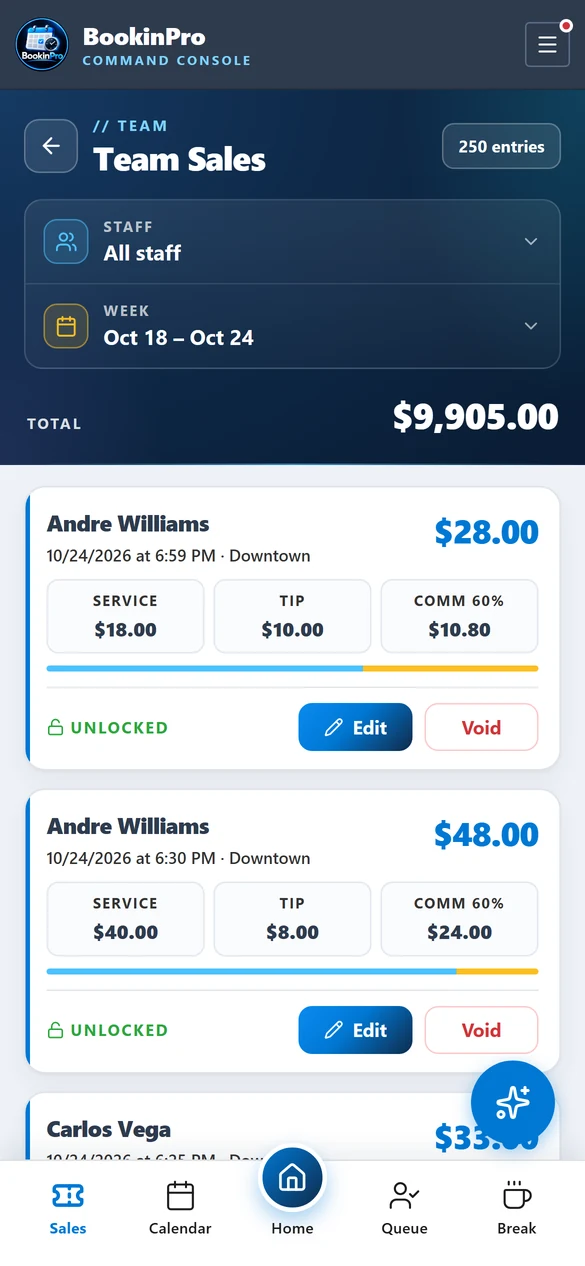
Team sales and tips on the staff app

What you get

  • Install from the browser on iPhone and Android
  • Home screen: appointments, sales today, who's up next, the week ahead and top staff
  • Mobile calendar with a date strip, location switcher and search
  • Long-press to drag appointments and breaks
  • Bottom-sheet forms sized for thumbs
  • Screens that don't bounce or slide, just like a native app
  • Branded splash screen at launch

Why it matters

Staff check their day, block a break or book a returning client without walking to the front desk.

Best for

Every team member, especially booth renters and mobile pros.

Back to top
15 · Team & mobile

Offline-ready, always current

Shop Wi-Fi isn't always perfect. BookinPro saves to the device first, so changes show instantly, and syncs as soon as the connection is back.

What you get

  • Saved appointments appear instantly, even on a weak signal
  • Changes sync automatically when the connection returns
  • Automatic check for new releases
  • Optional quiet updates in the background, with no pop-up
  • Never reloads while the device is offline
  • Signing out clears this device's stored data on shared computers

Why it matters

A booking made during a Wi-Fi hiccup still counts, and nobody has to remember to update the app.

Best for

Shops with spotty internet and teams on cellular data.

Back to top
16 · Team & mobile

Roles & permissions

Give each person exactly the access they need. Owners see everything; a new hire sees their own chair.

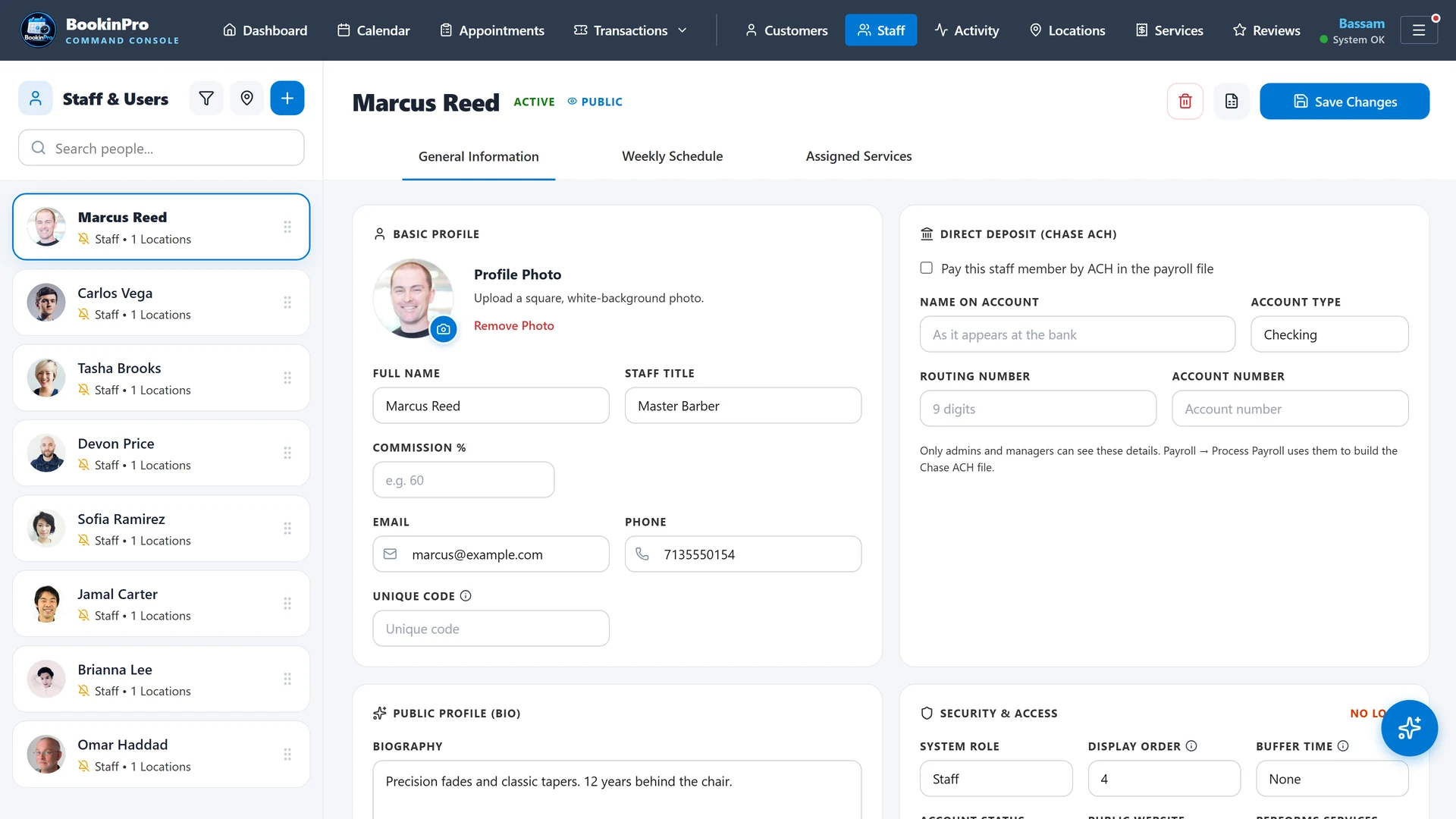
admin.bookinpro.app/your-shop · Staff
Staff profile and access settings

What you get

  • Five roles: Admin, Manager, Supervisor, Customer Service and Staff
  • A page-by-page access matrix for each role
  • Access to one location, several, or all of them
  • Customer phone and email hidden from the roles you choose
  • Bookable and visible-online switches for each staff member
  • Staff change their own passwords
  • An audit trail of who changed what

Why it matters

Your customer list is your business. Permissions keep it safe without slowing anyone down.

Best for

Growing teams and multi-location owners.

Back to top
17 · Team & mobile

AI assistant

Built-in AI helps managers and staff get answers and write faster, right inside BookinPro.

What you get

  • An AI chat assistant that answers questions about the app and your day
  • An AI schedule optimizer in Reports
  • AI-written staff bios for the booking site
  • AI help writing campaign messages
  • A knowledge base the assistant can draw on

Why it matters

Less time on writing and how-to questions, and more time with customers.

Best for

Owners and managers who handle marketing and training themselves.

Back to top
18 · Business

Multi-location control

Run one shop or ten from the same account. Each location keeps its own hours, services and team, and owners see them all.

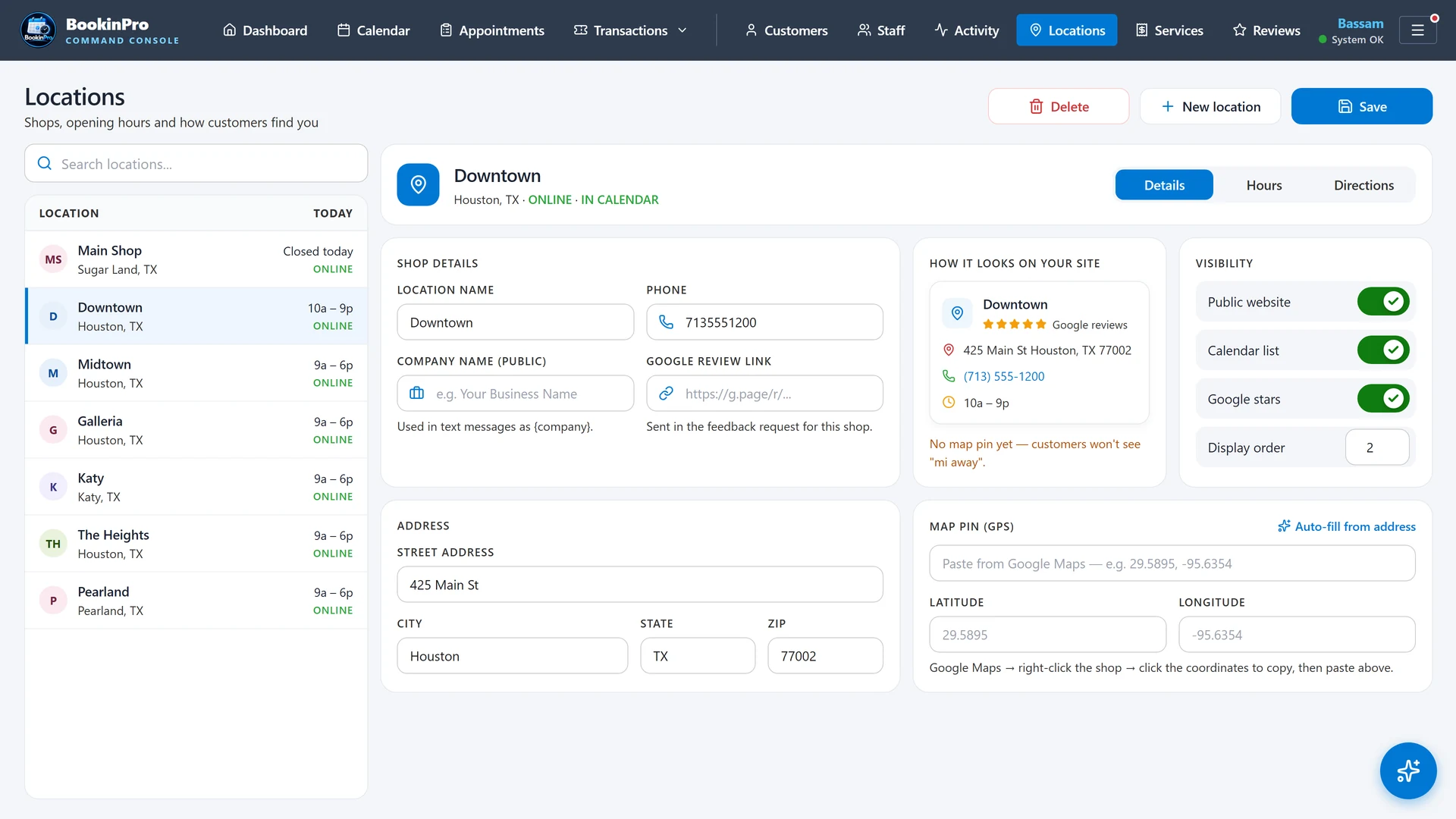
admin.bookinpro.app/your-shop · Locations
Locations screen

What you get

  • Every location in one account
  • Address, hours and one-day changes for each location
  • Services offered per location
  • Staff assigned to one or more locations
  • A location switcher on every screen
  • How-to-find guide: nearby landmarks from Google and turn-by-turn directions
  • Address suggestions as you type
  • Reports for each location or all of them

Why it matters

Growing to a second shop shouldn't mean a second system.

Best for

Owners with two or more locations, or planning to open one.

Back to top
19 · Business

Reports & analytics

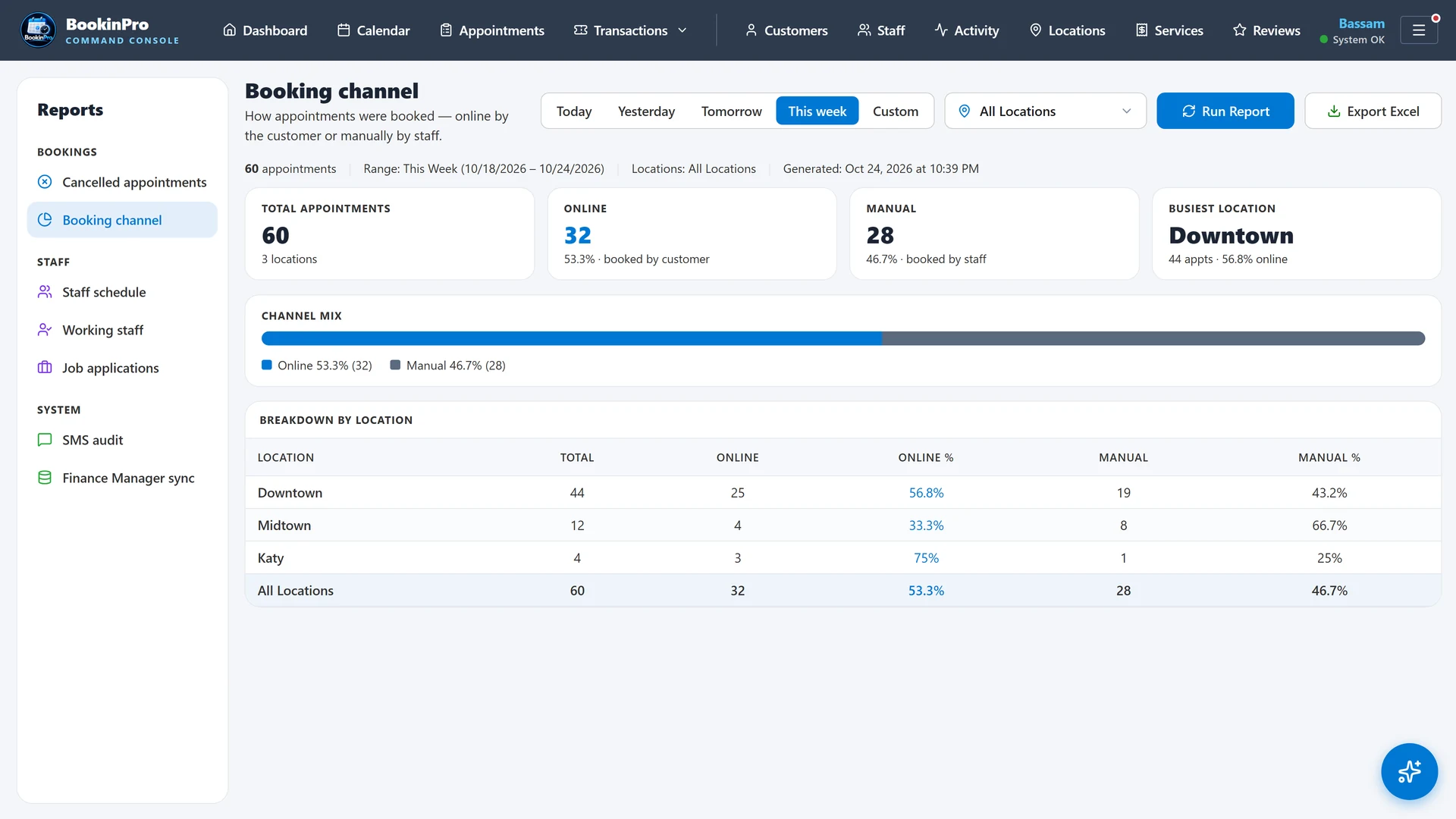
See how the business is really doing: where bookings come from, who cancels, which messages reached customers and how each chair performs.

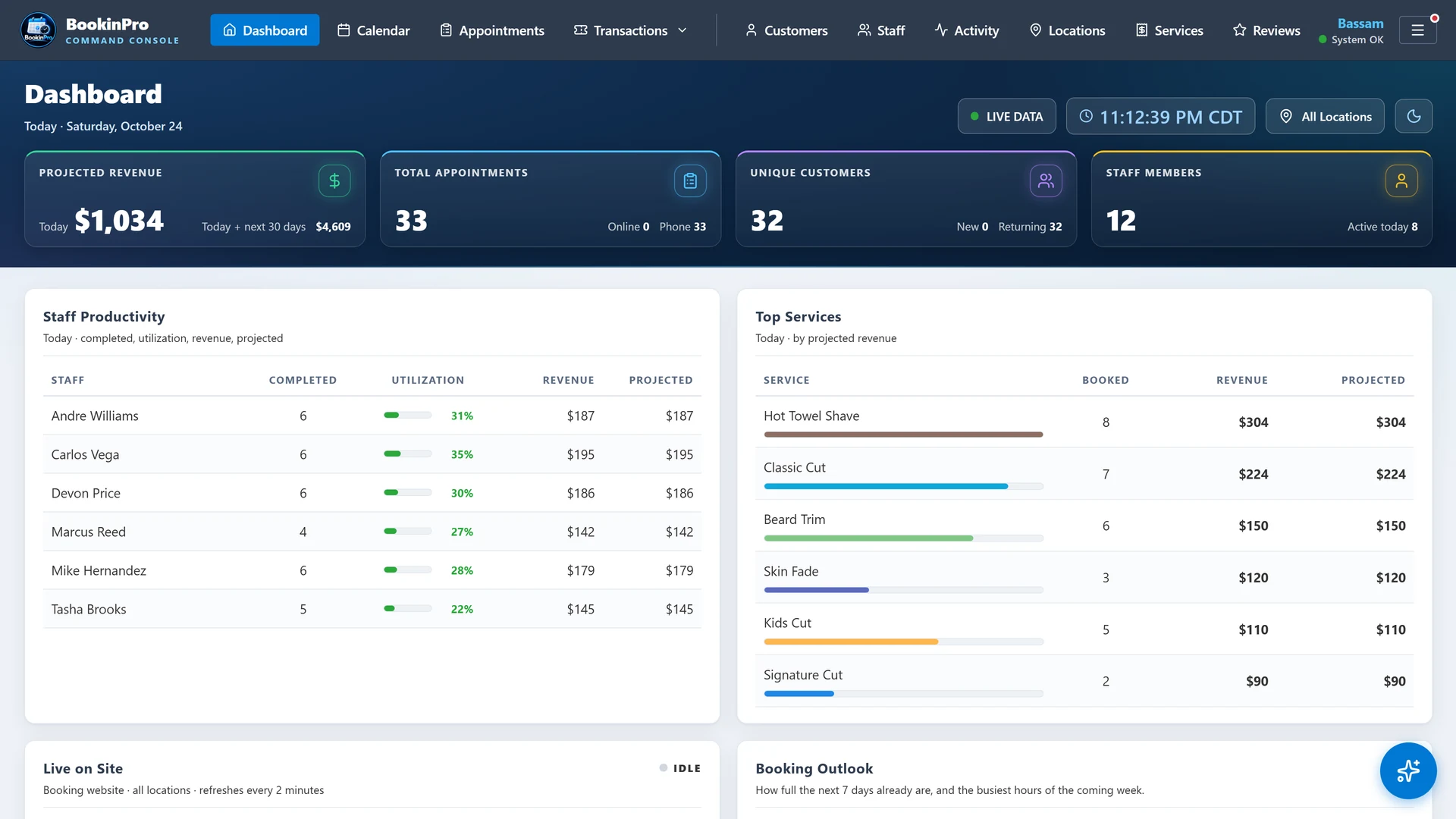
admin.bookinpro.app/your-shop · Dashboard
Dashboard
admin.bookinpro.app/your-shop · Reports
Booking channel report

What you get

  • Dashboard with today's bookings, completed visits, revenue and alerts
  • Booking channel report: online, front desk or staff phone
  • Cancellations with reasons and a trend chart
  • Text message audit with delivery status
  • Staff schedule report in calendar layout
  • Staff activity report
  • Revenue by service, staff and location
  • Grouped report menu with quick date buttons, and Excel export

Why it matters

Decisions about staffing, hours and marketing should come from numbers, not guesses.

Best for

Owners and managers who review the week every Monday.

Back to top
20 · Business

Square POS sales sync

Connect your own Square account and BookinPro credits each sale and tip to the right barber as soon as the order closes.

What you get

  • Connect your shop's own Square account
  • Each sale credited to the barber chosen on the service line
  • Tips split evenly between the barbers on an order
  • Updates in real time as orders close
  • A daily view for each barber
  • Square keys stored on the server, never in the browser

Why it matters

Payday becomes a report instead of an evening with a calculator.

Best for

Commission and booth-rent shops that take payment through Square.

Back to top
And there's more

40 more features in every plan.

The details that make a busy day run smoothly.

admin.bookinpro.app/your-shop · Services
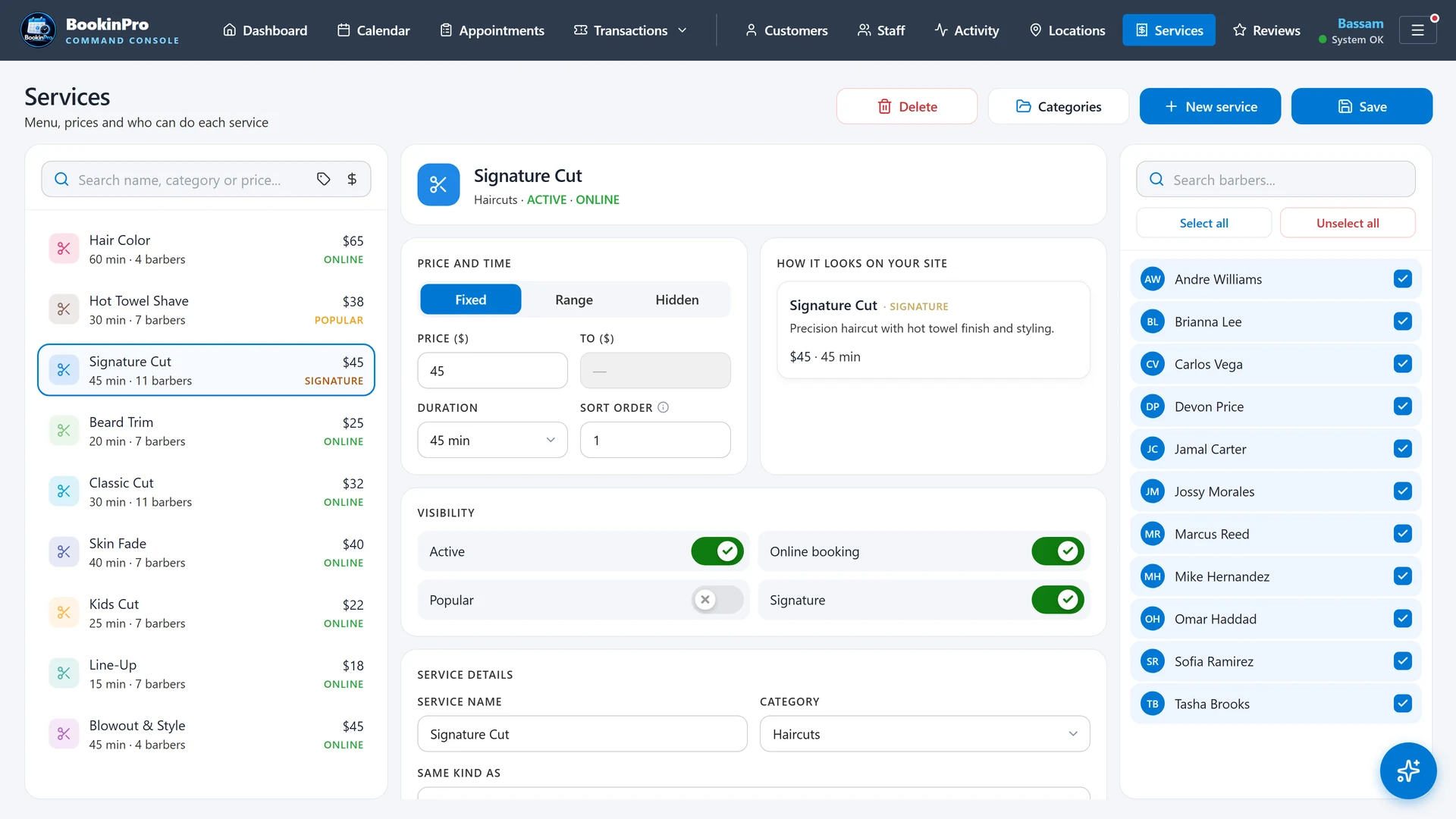
Services screen

Scheduling

  • One-day staff schedule changes
  • Buffer time per staff member
  • Working-staff-only filter
  • Custom calendar row height
  • Choose how many days ahead stay live
  • Past appointment lookback setting
  • Saved staff column order

Appointments

  • Several services in one appointment
  • "Staff requested" tracking
  • Price override
  • See your changes before saving an edit
  • Pasted phone numbers cleaned automatically
  • Cancellation reasons, never deletions
  • Visits complete automatically after the service ends

Messaging

  • Email manager with templates
  • Template variables for name, service and time
  • Custom text-message opt-in wording
  • Daily overdue-task summary email
  • Task assignment notices
  • Message usage tracking

Team

  • Tasks panel linked to customers
  • Follow-up switch that creates a task from the appointment
  • Staff profiles with title, bio and photo crop
  • Team announcements
  • Job applications inbox
  • Live arrivals board with customer ETA

Admin tools

  • Settings search (Ctrl+K) with a floating Save bar
  • Booking and cancellation windows
  • Spreadsheet import wizard
  • Duplicate customer check
  • System logs
  • "What's New" release notes in the app
  • Service library with categories, colors and assigned staff

Security & trust

  • Full appointment history: who, when and what changed
  • Customer notes history
  • Each business's data kept completely separate
  • Private keys stored only on the server
  • Verified email sign-in for staff
  • Secure cloud hosting on Google
  • Daily system health monitoring

Try every feature free for 30 days.

Create your shop in minutes and see BookinPro run your own calendar, booking site and staff app.

Start Free Trial